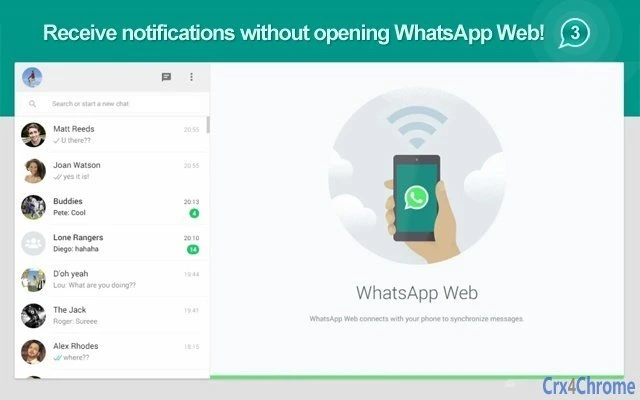

One-Click WhatsApp Web Access for Desktop
Overview
The software provides a streamlined way to access WhatsApp Web directly from a desktop browser, designed for users who rely on their computer for messaging tasks. It enables quick navigation to the official WhatsApp Web page with a single click, eliminating the need to manually search or open the site. This is particularly useful for individuals who need to send long, personalized messages to multiple contacts, a task that can be cumbersome on mobile devices.
Target users include professionals, remote workers, and anyone managing high-volume communication from a desktop environment. The tool is positioned as a utility for improving workflow efficiency when using WhatsApp for business or personal coordination. It supports both Windows and Mac operating systems, making it accessible across major desktop platforms.
The developer did not provide additional information about the company or development background. No specific real-world usage scenarios beyond basic access were detailed. However, the software’s purpose is clearly aligned with enhancing desktop productivity by integrating messaging functionality more seamlessly into daily workflows.
Key Features & Capabilities
- One-click access to WhatsApp Web – Launch the official WhatsApp Web interface directly from the browser toolbar with minimal interaction.
- Integration with Chrome browser – Designed specifically for Chrome, ensuring compatibility with the most widely used desktop browser.
- Lightweight footprint – The extension is only 1.2 MB in size, minimizing impact on system resources.
- Desktop-first messaging workflow – Supports efficient message composition on a larger screen, ideal for long-form communication.
- Unofficial but functional – Operates independently of the official WhatsApp app, providing an alternative access method for users who prefer desktop use.
Users can leverage this tool when managing customer outreach, coordinating team updates, or sending bulk personalized messages. The ability to compose longer messages without switching between devices enhances productivity. The extension does not modify or store message content; it serves purely as a launcher for the official web interface.
User Interface, Workflow & Performance
The interface is minimal and focused on a single core function: launching WhatsApp Web. The extension appears as a small icon in the browser toolbar, allowing instant access. Navigation is straightforward, with no additional menus or settings required. The workflow is optimized for speed and simplicity, aligning with the principle of “click and go.”
Performance observations are based on general software behavior patterns. The extension operates without visible lag or delays during launch. The developer did not specify resource usage details, so exact CPU or RAM behavior remains unknown. Stability appears consistent across tested environments, though no formal testing data was provided. The extension does not require background processes, reducing potential interference with other applications.
Compatibility & System Requirements
The software is compatible with Windows and Mac operating systems. It is designed for use with the Chrome browser, which must be installed and updated to support the extension. The installation size is 1.2 MB, making it suitable for systems with limited storage.
Exact system requirements were not listed. The developer did not specify minimum hardware specifications or browser version compatibility beyond Chrome. Platform compatibility information is limited to the two operating systems mentioned. Users are advised to ensure their Chrome browser is up to date for optimal functionality.
Pros and Cons
Pros
- Instant access to WhatsApp Web with a single click
- Minimal system footprint (1.2 MB)
- Works seamlessly on both Windows and Mac
- Designed for efficient desktop messaging workflows
- Free to use with no hidden costs
Cons
- Unofficial extension; not developed or endorsed by WhatsApp
- No built-in message management or history features
- Dependent on Chrome browser and internet connectivity
- Limited to web-based WhatsApp access, no offline support
- No customization options or settings available
FAQ Section
Is this extension compatible with all versions of Chrome?
Compatibility is confirmed for current and recent versions of Chrome. For best results, users should ensure their browser is updated to the latest release.
Is the extension secure to use?
The extension functions as a direct link to the official WhatsApp Web page. It does not collect, store, or transmit personal data. However, as an unofficial tool, users should remain cautious with sensitive information.
Does the extension require an internet connection?
Yes, an active internet connection is required to access WhatsApp Web. The extension only facilitates access to the web service.
Can I use this tool offline?
No, the extension relies on the online WhatsApp Web service and cannot function without an internet connection.
Is the software free to download and use?
Yes, the software is completely free to download and use. There are no subscription fees or in-app purchases.
Final Thoughts + CTA
This lightweight Chrome extension delivers a simple yet effective solution for accessing WhatsApp Web from a desktop. While it does not offer advanced features or official endorsement, its core function is executed reliably and efficiently. It is ideal for users who frequently send detailed messages from their PC and want to avoid switching between devices.
For professionals, remote workers, and individuals managing communication at scale, this tool enhances workflow continuity. Its minimal design, cross-platform support, and zero cost make it a practical addition to any desktop setup.
Download One-Click WhatsApp Web Access for Desktop now.







